The TI-34 MultiView has the capability to convert fractions into decimals and also toggle among various formats for answers. The key issue here is to position the cursor outside the fraction before performing the conversion. This way, the operation becomes predictable and also facilitates calculations involving mixed numbers.
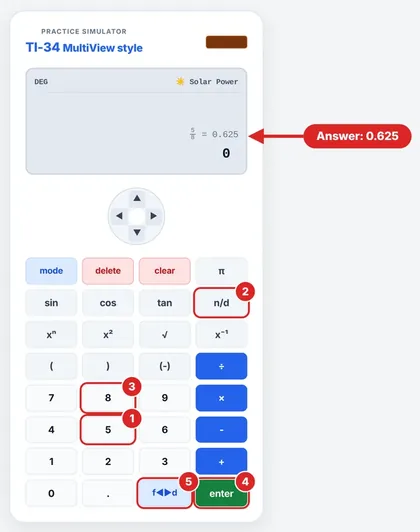
The Walkthrough: 5/8
Press n/d to display the fraction template.
Type the numerator: 5.
Press ▼ then type the denominator: 8.
Press ► to position the cursor outside the fraction.
Press 2nd f↔︎d.
0.625 appears on-screen, therefore 5/8 equals 0.625. To revert back to fraction format (if possible), press 2nd f↔︎d.
What is often forgotten is step 4; the conversion will not function properly if the cursor is inside the fraction.
More Fractions to Try
| Fraction | Decimal | Notes |
|---|---|---|
| 1/4 | 0.25 | |
| 3/4 | 0.75 | |
| 6/8 | 0.75 | Same value as 3/4, since simplifying doesn’t change it |
| 7/20 | 0.35 | Check: 0.35 × 20 = 7 |
| 2/5 | 0.4 | |
| 3/8 | 0.375 | |
| 2/3 | 0.666… | Repeats forever |
Decimals are also a quick way to compare fractions: 2/5 = 0.4 and 3/8 = 0.375, so 2/5 is larger.
Why Some Decimals Never End
Since the numbers 2 and 5 are the only prime factors of 10, fractions such as 1/2, 1/4, and 3/8 end (terminate). Fractions such as 1/3 and 2/3 will recur since 3 is not a factor of 10 to any power. Although memorizing the above is not essential for using the calculator, it helps explain what you will observe.
Rounding the Result
Round only when the problem asks you to, and only at the end. For 2/3 = 0.666…:
- Nearest tenth: 0.7
- Nearest hundredth: 0.67
Same fraction, different answers, so always check the instruction.
If Something Looks Wrong
| Problem | Fix |
|---|---|
| The calculator still shows a fraction | Move the cursor outside the fraction before pressing 2nd f↔︎d |
| I entered a mixed number | The TI-34 MultiView handles mixed numbers and improper fractions. Check the fraction mode and use the conversion shown in the guidebook |
| My answer looks different from a friend’s calculator | Compare display and fraction settings. The same value can appear as a fraction or a decimal |
Checking the Answer Without a Calculator
This is a simple process that can be done manually at any time to verify the result. Doing 5/8 through long division produces 0.625, which is the same answer as on the screen. You can also reverse the process to make sure the answer is right: 0.625 times 8 is 5, which is the numerator we started with.
Why Convert at All?
Decimals simplify certain tasks. Decimals are the fastest way of comparing fractions as seen when you compared 2/5 and 3/8. Decimals are also used for money and most other measurements. A quarter of an hour is 1/4 = 0.25 hours, which is 15 minutes. A decimal is just a small step away from a percentage as 0.625 becomes 62.5%.
FAQs
How can I change 1/4 to a decimal?
Type 1/4, exit from the fraction, and press 2nd f↔︎d. We get 0.25.
Is the TI-34 MultiView able to convert mixed numbers?
Yes, it is. This calculator has the ability to convert fractions to mixed numbers and vice versa.
Why should I exit the fraction?
Moving out of the fraction tells the calculator that we have finished entering the fraction.
Why does 1/3 never end?
Because 3 doesn’t divide any power of 10, so its decimal repeats. The screen shows only part of the number.
Will it make any difference if we simplify the fraction first?
No, it will not because 6/8 = 3/4 = 0.75.
Do I need to round the decimal on the calculator?
No, only when the question requires it. Keep the extra digits till the last step whenever possible.
Can I change the decimal to a fraction?
Yes, if the decimal number can be converted through the calculator’s fraction conversion mode. Just press 2nd f↔︎d once more.
How do I change the decimal to a percent?
Multiply the result by 100; thus, 0.625 will be changed to 62.5%. You may also use 2nd ►%; see the percentages tutorial for more details.
Which one should I take for the answer – fraction or decimal?
If your task asks for exact fractions, use exact fractions. If it asks for decimals, use decimals.
How do I compare two fractions using the calculator?
Change the fractions to decimals and compare. 2/5 = 0.4, and 3/8 = 0.375, therefore, 2/5 is bigger. It’s usually quicker than finding a common denominator.
Up next: How to Do Percentages on the TI-34 MultiView
TI34Calc is an independent educational site, not affiliated with, endorsed or sponsored by Texas Instruments. TI-34 MultiView and TI-30XS MultiView are trademarks of Texas Instruments. Always follow your teacher’s and exam board’s calculator rules.