The fraction calculator will help you perform all operations with fractions without being confused with all the calculations. Employ the calculator for quick verification of your solution; however, make sure that you see all the calculations when you are studying since the calculator can verify the solution while the calculations explain it.
The Four Rules at a Glance
| Operation | Rule | Example |
|---|---|---|
| Add | a/b + c/d = (ad + bc) / bd | 1/4 + 2/4 = 3/4 |
| Subtract | a/b − c/d = (ad − bc) / bd | 5/6 − 1/4 = 7/12 |
| Multiply | a/b × c/d = ac / bd | 2/3 × 3/4 = 6/12 = 1/2 |
| Divide | a/b ÷ c/d = a/b × d/c | 3/5 ÷ 9/10 = 2/3 |
The simplest way to reduce the fraction is to follow the method of dividing both the numerator and denominator of the fraction by their highest common factor. As an example, we find that 12/18 can be reduced to 2/3 because 6 is the highest common factor of 12 and 18.
Adding and Subtracting: Get a Common Denominator First
It requires having equal sized portions prior to their combination, so the denominators have to be equal.
In case they are equal, simply add the numerators.
For example, when you add ¼ to 2/4, you add 1+2=3, leave the denominator as 4 and get the result 3/4.
If they are not equal, then finding a common denominator should be the initial step. In the case of 5/6 − 1/4, the lowest common denominator of 6 and 4 is 12:
- 5/6 = 10/12
- 1/4 = 3/12
- 10/12 − 3/12 = 7/12
The answer is 7/12.
Multiplying and Dividing: No Common Denominator Needed
Multiply the 2 numerators and also the 2 denominators in the case of multiplication.
In case of division you need to follow one more step. You need to keep the first fraction the same, flip the other and multiply. For 3/5 ÷ 9/10
Keep 3/5
Flip 9/10 so it becomes 10/9
Multiply 3/5 × 10/9 = 30/45
Divide 30/45 by 15 to get 2/3.
If your answer is an improper fraction, you can easily convert it into a mixed fraction because it is easier to read in this form.
This applies to mixed fractions as well since they can be turned into improper fractions to do calculations.
Checking Your Answer on a TI-34 MultiView
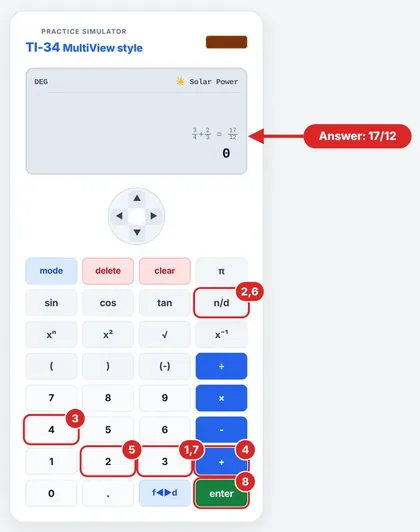
In MathPrint mode, this is how to enter 3/4 + 2/3:
Press n/d, type 3, press Down Arrow and type 4.
Press Right Arrow to exit the fraction.
Press +.
Press n/d, type 2, press Down Arrow and type 3.
Press Right Arrow and then press ENTER.
The result is 17/12. You can convert this fraction into a mixed number using the fraction conversion feature. The keypresses above follow the procedure for entering fractions on the MathPrint display from the official TI-34 MultiView manual.
Three Mistakes to Watch For
Summing the Denominators. You should not sum the bottoms. 1/4 + 1/4 = 2/4 and not 2/8.
Missing the Reciprocal during Division. You should flip only the second fraction.
Not completing the task. 6/8 is a correct answer, but not a completed one. To reduce it, divide by the GCF.
FAQs
Is it possible to use a fraction calculator for mixed numbers?
You can convert mixed numbers into improper fractions, perform the operation and then convert them back to mixed numbers.
Why do we need a common denominator for adding fractions?
This is because it makes the denominators equal, and so we can add or subtract the numerators.
Do we need to find a common denominator for multiplying fractions?
No, just multiply the numerators and denominators separately.
What is a reciprocal?
It is a fraction turned upside down. For example, 10/9 is the reciprocal of 9/10. To divide by a fraction, find its reciprocal and then multiply.
Can I divide a fraction by a whole number?
Yes. Write the whole number over 1 and then multiply by its reciprocal. For example, 3/4 ÷ 2 = 3/4 × 1/2 = 3/8.
Can I add three fractions at the same time?
Yes. You just need to find a common denominator, convert them and add them.
How will I know if a fraction is simplified?
You will know when there is no common factor between the numerator and denominator other than 1. It means that the fraction is completely simplified.
Can a fraction calculator represent decimals?
Yes. A fraction calculator may provide a result in decimals, while the TI-34 MultiView calculator has a fraction/decimal key.
TI34Calc is an independent educational site and is not affiliated with Texas Instruments. Key names are given for the TI-34 MultiView for reference; check your calculator’s manual for your exact model.