Most TI-34 MultiView error messages serve as indicators of something wrong with the equation or the current status of the calculator. Instead of pressing buttons continuously, it is advisable to read the message, clear it and analyze the problematic section of the equation.
What to Do When Any Error Appears
1. Read the message rather than immediately pressing to start over.
2. Press the clear button to clear the error message.
3. Check the expression, particularly the part around the cursor.
4. Solve one possible problem and then press ENTER.
Changing several things at once makes it hard to tell what caused the problem.
Every Error at a Glance
| Error | What it means | What to check |
|---|---|---|
| SYNTAX | The expression is structured wrongly | Misplaced functions, parentheses or separators |
| DIVIDE BY 0 | Something is being divided by zero | The denominator |
| DOMAIN | A function got a value it can’t accept | The input, e.g. a negative number under √ |
| OVERFLOW | The number is too large for the calculator | Simplify or rewrite the calculation |
| ARGUMENT | A function has the wrong number of inputs | How many values the function needs |
| EQUATION LENGTH ERROR | The entry is too long | Break it into smaller steps |
| STAT | Statistics data is missing or lists don’t match | Your data lists |
| FRQ DOMAIN | A frequency value is below the allowed range | Frequency values in one-variable stats |
| CONVERSION | A list conversion has an invalid list reference or function | The list and function used |
| OP NOT DEFINED | Stored operation op1 or op2 hasn’t been set up | Define the operation, or type the expression directly |
The Three You’ll See Most
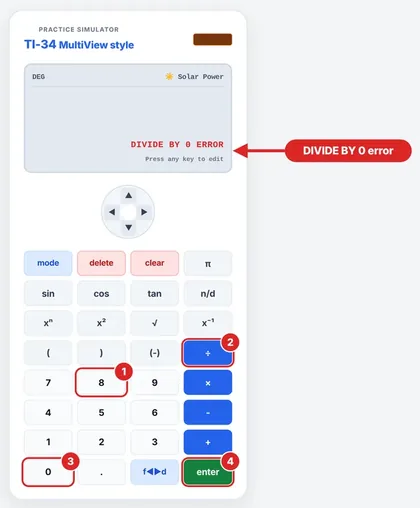
DIVIDE BY 0
If you enter 8 ÷ 0, you will see this, since dividing by zero is not defined. Press clear, replace 0 with some other nonzero number, and try it again.
DOMAIN
Entering √(−4) gives a DOMAIN error, because a square root of a negative number is not defined in the reals. Be careful not to just put in whatever “looks right.” In school problems, the proper solution might be that there isn’t one.
The TI guidebook also lists a DOMAIN error when the SIMP command needs a denominator larger than can be displayed.
SYNTAX
Usually a missing parenthesis, a misplaced function or an incorrect separator. Read the expression slowly from left to right.
SYNTAX vs ARGUMENT: What’s the Difference?
The two terms are different. SYNTAX refers to the way in which an expression is written. On the other hand, ARGUMENT refers to the number of arguments provided in the function. For example, if a function requires two arguments but only one was provided, it will be called an ARGUMENT error.
Still Getting Errors?
Enter a much simpler equation such as 2 + 3. If this works out, the calculator is okay and the fault must lie in some portion of your original input. If it was an operation that you had stored, check whether either op1 or op2 had been defined. Regular arithmetic does not need any operations to be stored.
Errors You Can Prevent
Most mistakes are preventable by following some simple practices:
Making sure all parentheses have closing parentheses, and counting them before hitting the ENTER button.
Making sure denominators do not contain anything which can make their value zero.
Making use of the negative button (-), and not the subtraction button, to enter negative numbers.
Keeping entries shorter by making calculations in stages and noting down each answer.
Error Message FAQs
Does the error indicate that my calculator is faulty?
Generally no. An error message usually indicates an issue with the entered input or function domain.
How do I get rid of an error?
Press clear and then fix the entered expression.
Am I going to lose my expression if an error message comes up?
No, pressing clear will bring you back to the expression.
What leads to a SYNTAX error?
Typical causes of such errors are the absence of parentheses, wrong position of the function and incorrect arguments or separators.
What is the meaning of DOMAIN?
The input is not within the domain of the function.
Why am I getting the message OVERFLOW?
The output value exceeds the calculator's limit, especially with exponents that are very high. Try to separate the problem into parts.
Can a well-written expression still cause an error?
Certainly. Division by zero is one of the examples; for instance, 5 ÷ (3 - 3) leads to DIVIDE BY 0 because of zero inside parentheses.
How can I access the entire list of error messages?
Check out the TI-34 MultiView guidebook produced by Texas Instruments.
What does ARGUMENT mean?
The function was entered with an incorrect number of arguments, for example, when the input should consist of two numbers but there is only one.
Is it necessary to reset the calculator to solve the issue with errors?
Only as a last resort. The majority of problems with errors come from the expression itself.
Up next: TI-34 MultiView vs TI-30XS MultiView: Which Should You Buy?
TI34Calc is an independent educational site, not affiliated with, endorsed or sponsored by Texas Instruments. TI-34 MultiView and TI-30XS MultiView are trademarks of Texas Instruments. Always follow your teacher’s and exam board’s calculator rules.