Fractions, decimals and percentages are actually the same thing, or you can say they are different ways of explaining the same value. To identify an error you need to understand the relationship, because a converter's work is only to convert things instantly. And you know that 3/5, 0.6 and 60% are a fraction, a decimal and a percentage that all mean the same.
Common Conversions Worth Knowing
| Fraction | Decimal | Percent |
|---|---|---|
| 1/2 | 0.5 | 50% |
| 1/4 | 0.25 | 25% |
| 3/4 | 0.75 | 75% |
| 1/5 | 0.2 | 20% |
| 3/5 | 0.6 | 60% |
| 1/8 | 0.125 | 12.5% |
| 1/3 | 0.333… | 33.3…% |
| 2/3 | 0.666… | 66.6…% |
Three Rules That Do All the Work
Fraction to decimal: Divide the top number (numerator) by the bottom number (denominator). You can do this by manual calculation or with a calculator.
Decimal to percent: You can do this by multiplying the decimal value by 100 and adding a % sign.
Percent to decimal: divide by 100.
If you want a direct conversion, you can apply rules 1 and 2 shown above in sequence. 3/5=0.6 and 0.6 x100 =60%
Real Example: Your Test Score
You got 17 out of 20 questions right.
- Fraction: 17/20
- Decimal: 17 ÷ 20 = 0.85
- Percent: 0.85 × 100 = 85%
So 17/20 = 0.85 = 85%.
Going Backwards
From decimal to fraction: Write the decimal number over the place value, and then reduce. Example: 0.75 = 75/100 = 3/4.
From percent to fraction: Write the percent over 100, and then reduce. 40% = 40/100 = 2/5.
When the Decimal Never Ends
Certain fractions yield terminating decimals such as 1/8 which equals 0.125. Other fractions repeat indefinitely. 1 divided by 3 equals 0.333…. The ellipsis indicates that the three repeats forever, and therefore 1/3 is equal to 33.333….%
Avoid cutting off your repeating decimals midway through calculations. Instead, find out how many digits you require, and carry out the rounding at the end. The whole percent nearest to 1/3 is 33%.
Doing It on the TI-34 MultiView
The TI-34 MultiView has built-in fraction, decimal and percent conversions.
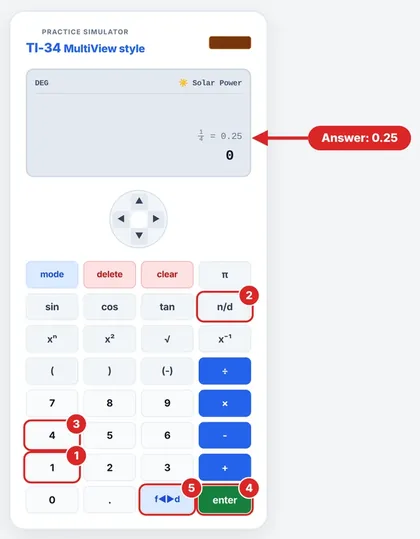
1/4 to a decimal:
- Press n/d, enter 1, press ▼, enter 4.
- Press ► to move outside the fraction.
- Press 2nd f↔︎d. The display changes to 0.25.
1/8 to a percent:
- Enter 1, press n/d, then enter 8.
- Press ► to move outside the fraction.
- Press 2nd ►%, then ENTER. The display shows 12.5%.
The exact display can depend on the calculator’s mode and the type of value entered.
Watch Out For
Misdividing. 3/5 is equivalent to 3 ÷ 5, and not 5 ÷ 3. It is also important to take note of how the decimal moves. In converting decimals into percents, it is moved two spaces to the right.
Will the Decimal End or Repeat? A Quick Test
Reduce the fraction first, and check the denominator. If it only consists of 2s and 5s, the decimal is terminating. Otherwise, it is repeating.
- 3/8 is terminating, since 8 = 2 × 2 × 2. The decimal representation is 0.375.
- 7/20 is terminating, since 20 = 2 × 2 × 5. The decimal representation is 0.35.
- 1/6 repeats, because 6 = 2 × 3. It’s 0.1666…
It’s a handy way to know what to expect before you press any keys.
Quick Questions
Are the three equivalent?
If they have the same value, then yes. It’s just another way of representing the number. 1/2, 0.5, and 50% are equivalent.
What’s the process of changing a fraction directly into a percentage?
Divide the top by the bottom, then multiply by 100. In the case of 3/5, that would be 0.6 x 100 = 60%
How do you change a decimal into a fraction?
It is very easy. Suppose you have the decimal 0.75. Then it is equal to 75/100, which is ¾.
Can I convert a percent back into a fraction?
Yes, you can. Place the percent over 100 and simplify. For example, 40% = 40/100 = 2/5.
How can I express 0.5% as a decimal?
Division by 100: 0.5 ÷ 100 = 0.005. It’s easy to make mistakes with small percentages since the result has many more zeroes.
What is 125% as a decimal?
1.25. If a percent is above 100, the decimal will be above 1.
Why does my calculator show 0.3333333333 but not 0.333…?
This is because there is only a certain number of digits that a calculator screen can display, and it truncates or rounds repeating decimals. The digits go on infinitely.
When should I round the percentage?
You can round off whenever it is needed. Otherwise there is no need to do that.
TI34Calc is an independent educational site and is not affiliated with Texas Instruments. Key names are given for the TI-34 MultiView for reference; check your calculator’s manual for your exact model.