A reset on a TI-34 MultiView restores its default settings and the data saved on the calculator. This function becomes necessary when the calculator behaves abnormally due to changes in the mode or data entered into the machine. Due to the clearing effect of a reset, it should be applied carefully.
Before you do that, though, make sure a full reset is really what you need. Often it isn’t.
Clear or Reset? Know the Difference
| clear | Full reset | |
|---|---|---|
| What it does | Removes the current entry or an error message | Restores default settings and erases memory |
| Keeps your settings? | Yes | No |
| Keeps stored values? | Yes | No |
| When to use it | Almost every time something looks wrong | When you want a completely clean start |
If you only want to erase the expression you’re typing, press clear. A full reset is much more disruptive.
Try the Smaller Fix First
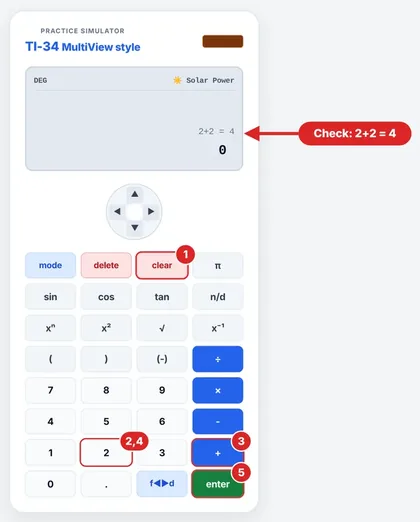
If the calculation seems to be incorrect, resetting will not work. Resetting will not correct a miscalculation error. Try this instead.
Press clear.
Determine what mode the calculator is set to.
Do an easy calculation such as 2+2.
If it works, then your calculator is in good condition and there must have been an input error before.
How to Do a Full Reset
List all the stored values that will be needed at a later time, since they will be erased.
Press 2nd.
Press reset. The Reset menu displays 1:No and 2:Yes.
Press 2 for Yes.
The message on the display will be MEMORY CLEARED.
Press clear.
Have second thoughts after step 3? Press 1:No and everything will remain intact.
After the Reset: A 30-Second Check
Type in 3 + 4 to ensure that your answer is 7.
If your class uses fractions, type a small fraction like 1/2 before you solve a lengthy problem.
Restore any settings that your instructor requires.
When the Calculator Won’t Turn On
According to TI troubleshooting instructions, one should try pressing on, then 2nd and 0, followed by 2. Alternatively, you can press clear and on simultaneously. In some models, there is a reset button on the back of the calculator.
Resetting a School Calculator
First, follow the policy at your school. Some instructors may require you to preserve certain configurations or information in storage. However, before an exam, you should only reset if the instructions indicate that you should do so.
When a Full Reset Actually Helps
- Resetting is appropriate in particular cases as follows:
- The device was used by someone else who modified some of its settings without your knowledge;
- You would like to free up memory from unnecessary data and operations;
- Your teacher requests resetting for the entire class to return all settings to default;
- You have attempted clear, verified the mode, and it is still acting in an unusual way.
If none of these apply, you probably don’t need one.
What a Reset Won’t Fix
Reset will restore the settings but not affect anything else. It will not solve:
An error in mathematics. Since the wrong numbers are entered, you will have the same wrong result after the reset.
The incorrect pressing of keys. You should pay attention to the sequence of actions and parentheses.
Problems with the power supply. A dim screen or inability to turn on the device most likely indicates that there is a problem with the power supply and not with the settings. See above.
This information will save you from clearing your values for nothing.
Common Questions About Resetting
Does reset clear calculator memory?
Yes. The TI-34 MultiView Teacher Guide says that reset clears memory and resets the default values.
Does reset clear all my homework?
No. It only has an effect on the calculator itself.
Is clear equivalent to reset?
No. clear clears the current input and error. The reset command resets the defaults and clears memory.
Is it possible to cancel a reset procedure?
Yes. When at the reset menu, select 1: No instead of 2: Yes.
Does reset affect my set parameters such as the mode?
Yes. Full reset sets all values back to default, so check the mode.
How long does it take to perform a reset?
Instantly. The MEMORY CLEARED message pops up as soon as you press Yes.
Should I do a reset before I start a test?
Yes, but only if instructed to by your teacher or the test itself.
Am I supposed to do a reset frequently?
No. It is used when defaults need to be restored and is not meant as a preparation step before each calculation. Use clear if you have doubts.
Why does it say MEMORY CLEARED on my display?
This means that you've performed a full reset. Click clear to get back to the home screen.
What should I do after a reset?
Perform a simple check, like 3 + 4. Check a fraction if your teacher has told you to use them. Reconfigure the settings according to your teacher's instructions.
Up next: How to Convert Fractions to Decimals on the TI-34 MultiView
TI34Calc is an independent educational site, not affiliated with, endorsed or sponsored by Texas Instruments. TI-34 MultiView and TI-30XS MultiView are trademarks of Texas Instruments. Always follow your teacher’s and exam board’s calculator rules.