An exponent calculator is used to calculate powers like 5², 3⁴, or 10⁻², but the notation is as important as the button you click to get an answer. The base is the number which is being multiplied, and the exponent represents how many times the base is multiplied by itself.
Exponent Rules Cheat Sheet
| Rule | Meaning | Example |
|---|---|---|
| aⁿ | a multiplied by itself n times | 4³ = 4 × 4 × 4 = 64 |
| a² | a squared | 5² = 25 |
| a³ | a cubed | 6³ = 216 |
| a¹ = a | Power of one | 9¹ = 9 |
| a⁰ = 1 | Zero power (a not zero) | 7⁰ = 1 |
| a⁻ⁿ = 1/aⁿ | Negative power means reciprocal | 4⁻¹ = 1/4 |
Three Kinds of Exponents, Worked Out
Positive exponents
Find 2⁵. Multiply 2 by itself five times: 2 × 2 × 2 × 2 × 2 = 32.
A zero exponent
Find 7⁰. Any nonzero number raised to the zero power equals 1, so 7⁰ = 1. It’s a common trap to think the answer should be 0.
A negative exponent
Find 10⁻². A negative exponent doesn’t make the answer negative. It means “take the reciprocal”:
10⁻² = 1/10² = 1/100 = 0.01
Where Does the Negative Sign Belong?
The parentheses determine if the negative sign becomes part of the base number.
(−3)² = (−3) × (−3) = 9
−3² = −(3 × 3) = −9
By the common order of operations rule, the squaring takes precedence over the negative sign, unless specified by parentheses. Always use (−4)² when the negative number is the base.
Powers Grow Fast
Let's consider 2⁵ = 32 and 2¹⁰ = 1,024. When you double the power, the result is not doubled. It gets multiplied by 32 instead. So the important point is to make an estimate first, as it will help you spot an extra zero or an incorrect power.
You will come across expressions such as 2³ × 2² = 2⁵, which can be explained easily, since you are actually multiplying five twos. Such rules are very helpful in algebra.
Powers on the TI-34 MultiView
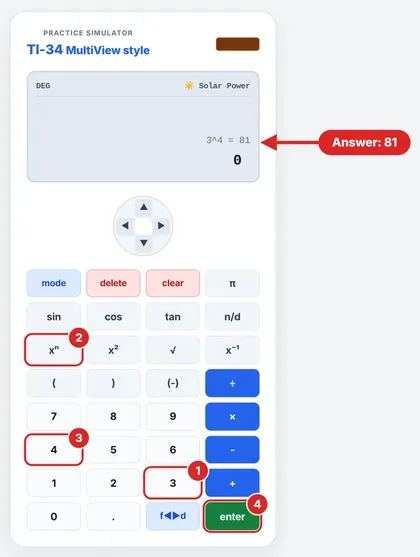
Powers are done using the ^ button. Texas Instruments gives this procedure to input 3⁴.
Enter 3.
Press ^.
Enter 4.
Press ENTER.
This gives you 81. In squaring numbers, there is a special button labeled x². When working with negative powers, you use negation (-), e.g., 10 ^ (-) 2 ENTER.
Show Your Work Before You Press Enter
Start by writing out one or two lines. If the problem is 5³, then write 5 x 5 x 5 = 125. For 5⁻², write 1/5² = 1/25. It helps build trust in the answer from the calculator once you’ve seen the rule, and that’s what teachers want.
Powers of Ten
| Power | Value | In words |
|---|---|---|
| 10³ | 1,000 | one thousand |
| 10² | 100 | one hundred |
| 10¹ | 10 | ten |
| 10⁰ | 1 | one |
| 10⁻¹ | 0.1 | one tenth |
| 10⁻² | 0.01 | one hundredth |
| 10⁻³ | 0.001 | one thousandth |
Notice the pattern: each step down divides by 10. That’s also why 10⁰ has to equal 1.
Questions Students Ask
What is the definition of an exponent?
It denotes the number of times the base is used as a factor.
What is 5²?
5 × 5 = 25; the superscript 2 denotes “squared.”
Why is 8⁰ = 1?
This is due to the zero-exponent property which gives 1 for all nonzero bases.
What does the negative exponent imply?
Negative exponent implies that the inverse of the corresponding positive exponent is taken. For example, 2⁻³ = 1/2³ = 1/8.
How is 2³ different from 3²?
2³ = 8 but 3² = 9; switching the base and exponent most of the time gives a different result.
Is it possible for an exponent to be a fraction?
Yes, a fractional exponent indicates a root. For instance, 9^½ = √9 = 3. You will encounter this a lot in algebra.
Is it possible for a calculator to work with very high powers?
Yes, but only up to a limit. Very high numbers could be presented in scientific notation and extremely high numbers will lead to overflow errors.
If I put the wrong power, how can I prevent that?
By writing down the base and the exponent individually before pressing the buttons on the calculator. In case of 3⁴, the base is 3 and the exponent is 4.
What is 10⁻³ as a decimal?
One thousandth or 0.001. The negative exponent of ten simply indicates how many places to the left we move the decimal point.
Is (−2)³ a negative or positive number?
Negative because (−2)×(−2)×(−2)= −8.
.
TI34Calc is an independent educational site and is not affiliated with Texas Instruments. Key names are given for the TI-34 MultiView for reference; check your calculator’s manual for your exact model.