The TI-34 MultiView has a percent button, which makes doing percentages simple once you know where to place the percent sign in the equation. The best thing to do would be to write the equation down first, and then type it into the calculator.
The Basic Pattern: 15% of 80
- Enter 15.
- Press %.
- Press ×.
- Enter 80.
- Press ENTER.
The result is 12. Every example below uses this same pattern.
Shopping: A 25% Discount
The price of the backpack is $48; the discount is 25%.
Type 25 % × 48 ENTER. The discount equals $12.
Subtract the amount: $48 − $12 = $36.
The calculator will give you the discount amount and not the final sale price of the item.
Eating Out: An 18% Tip
A meal costs $36.
- Enter 18 % × 36 ENTER. The tip is $6.48.
- Add it to the bill: $36 + $6.48 = $42.48.
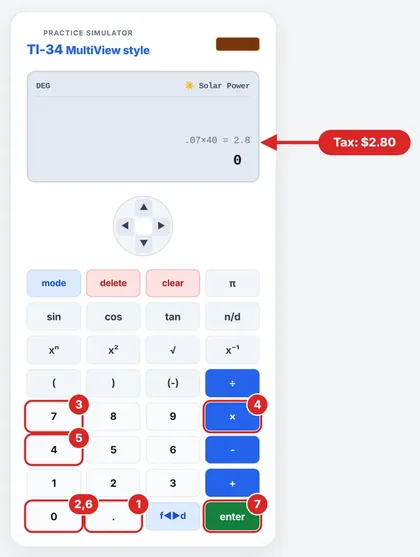
Sales Tax: 7% on $40
- 0.07 × 40 = $2.80 in tax.
- Total: $40 + $2.80 = $42.80.
You need to use the rate given in the question, as real tax rules may be more complex. Also, if the rate is in decimal form, you can skip the % key and simply multiply.
Percent Increase: 20 Students to 25
- Find the increase: 25 − 20 = 5.
- Divide by the original amount: 5 ÷ 20 = 0.25.
- Multiply by 100: 25%.
Turning a Fraction into a Percent
For 3/8: type in the fraction using n/d, click ► to get outside of it, then click 2nd ►% ENTER. The answer is 37.5%. This process is described by Texas Instruments for TI-34 MultiView.
“I Got 1200 Instead of 12”
That means that the calculator calculated 15 × 80 instead of 15% × 80; thus, it is possible that the % button has been omitted. Please remember that 15% is 0.15 when used in multiplication.
Good practice: Always express your problem using an equation first. The expression “18% of 50” is rewritten as 0.18 × 50 while the question “What percent is 9 of 12?” is written as 9 ÷ 12 × 100%. In this way, you will avoid pressing the wrong buttons for the calculation.
Percent Decrease: $50 Down to $40
It is exactly the same procedure, only reversed.
Calculate the decrease: 50 - 40 = 10.
Divide by the original quantity: 10 / 50 = 0.2.
Multiply by 100: 20% decrease.
Note that the answer is NOT 25%. The most common error made is to divide by the new price (40).
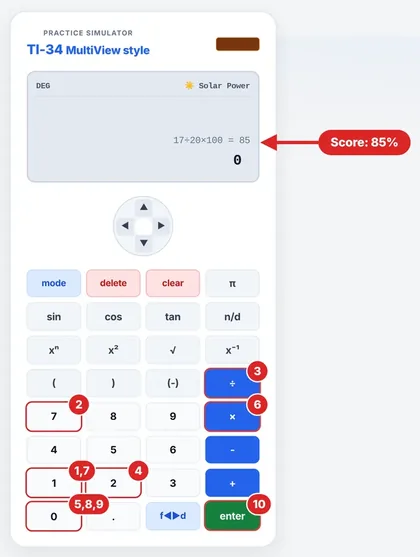
Test Scores on the TI-34 MultiView
You got 17 out of 20. To find your percentage, enter 17 ÷ 20 × 100 and press ENTER. The result is 85, so your score is 85%.
Estimate Before You Press Enter
A rough approximation will highlight any mistakes. For an 18% tip on $36, just remember to "round off to 20%." Since 10% of $36 equals $3.60, 20% would equal $7.20. The correct amount of $6.48 is slightly smaller, as expected. If the amount shown was $64.80, the mistake would have been obvious.
Quick Answers
How do I calculate 20% of 50?
Type 20 % × 50 ENTER. The answer is 10.
How do I convert 3/8 into percent?
Type 3/8, exit the fraction, then press 2nd ►% ENTER. The answer is 37.5%.
Do I need to use the [%] button?
No. You could also multiply by the decimal value: 0.15 × 80 = 12 will give the same result as 15 % × 80. Whichever way works better for your memory, do it that way.
How do I find a sale price in one step?
Just multiply by the percent you pay. If you have a 25% discount on $48, you're paying 75%, so 48 × 0.75 = $36.
How do I find an amount including tax in one step?
Just multiply by 1 plus the tax rate. For 7% tax on $40, you would type 40 × 1.07 = $42.80.
What percent is 9 out of 12?
Divide and multiply by 100: 9 ÷ 12 × 100 = 75%.
What is the difference between 20% and 20 percentage points?
Percent change is relative to a starting quantity; percentage points are the difference between two percentages.
Do I need to round percentages?
Always follow what the question tells you. If no rounding is required, don’t round early. Only do so at the very end.
How do I calculate a percent increase on the TI-34 MultiView?
Subtract to get the change, then divide the result by the original number, then multiply by 100. From 20 to 25: 5 ÷ 20 × 100 = 25%.
Can I calculate a percent of a fraction?
Sure. 50% of 3/4 equals 0.5 × 3/4 = 3/8. Follow the exact same order: the percent, then % button, then × and your fraction.
Source note: Texas Instruments Solution 20309 and TI-34 MultiView official documentation for percent calculations.
Up next: TI-34 MultiView Error Messages Explained
TI34Calc is an independent educational site, not affiliated with, endorsed or sponsored by Texas Instruments. TI-34 MultiView and TI-30XS MultiView are trademarks of Texas Instruments. Always follow your teacher’s and exam board’s calculator rules.